
Is your Google Business Profile (GBP) just sitting there, or is it actively working to bring you customers? Think of your GBP as your digital storefront on the world's busiest street. For most potential customers, it's their very first interaction with your brand online. A well-managed profile using the Google Business Profile Manager doesn't just put you on the map—it actively pulls in local customers right when they’re searching for your services. This guide promises to show you exactly how to turn your profile into a powerful client-attraction machine.
Why Your Google Business Profile is a Local SEO Powerhouse
Your Google Business Profile is hands-down one of the most powerful free marketing tools you can get your hands on. It acts as a direct line to people searching on Google and Google Maps, making it the absolute cornerstone of any effective local SEO strategy.
When someone searches for "plumber near me" or "best cafe in Sydney," Google analyzes well-optimized profiles to determine who deserves the top spots. A complete, active profile tells Google your business is legitimate and provides a great customer experience. This is how you land in the coveted "Local Pack"—that box with a map and three business listings right at the top of the search results page.
Driving Real-World Business Results
The impact of a strong profile goes beyond just visibility. It translates into real, measurable actions that grow your business. For Australian businesses, the statistics are compelling.
The average business listing receives 67 monthly actions, which breaks down to approximately 36 website clicks and 18 phone calls. Furthermore, 64% of Australian consumers use GBP to find accurate contact details for local businesses, proving its critical role in direct lead generation.
Let’s be blunt: every missing piece of information on your profile—like your opening hours, phone number, or a list of services—is a potential customer you've just lost. An incomplete profile creates friction and sends people straight to a competitor who made it easy for them.
Building Trust at a Glance
In a crowded marketplace, trust is your most valuable currency. Your GBP builds instant credibility using several key features that work together to create a solid first impression. These aren't just details; they're powerful trust signals that influence a customer's decision to contact you.
- Customer Reviews: Positive ratings and thoughtful responses show you genuinely care about customer satisfaction.
- High-Quality Photos: Authentic photos of your work, your team, and your location make your business feel more tangible and trustworthy.
- Up-to-Date Information: Accurate hours and contact details reassure customers that you are reliable and professional.
By getting a handle on your Google Business Profile Manager, you take control of this narrative. To go a bit deeper on this, it's worth understanding what local SEO optimisation is and how all these elements fit together.
Your Initial Profile Setup and Verification Playbook
Getting your Google Business Profile (GBP) off the ground correctly is the most important step. A strong foundation saves countless hours of frustration later and sets the stage for attracting local customers. This is your playbook for creating and verifying your profile correctly from the very start.
First, you'll need to head over to the Google Business Profile creation page and sign in with your Google account. You’ll be prompted to enter your business name, and it’s critical you get this right. Be precise—use your actual, registered business name.
It's a common mistake to try and stuff this field with extra keywords or locations (e.g., "Sydney’s Best Plumbing Experts" instead of just "Sydney Plumbing"). This is a direct violation of Google's policies and a fast track to getting your profile suspended before you even begin.
The whole process follows a clear path: create, verify, and then optimize the details. This visual guide breaks down the essential stages to get you started.
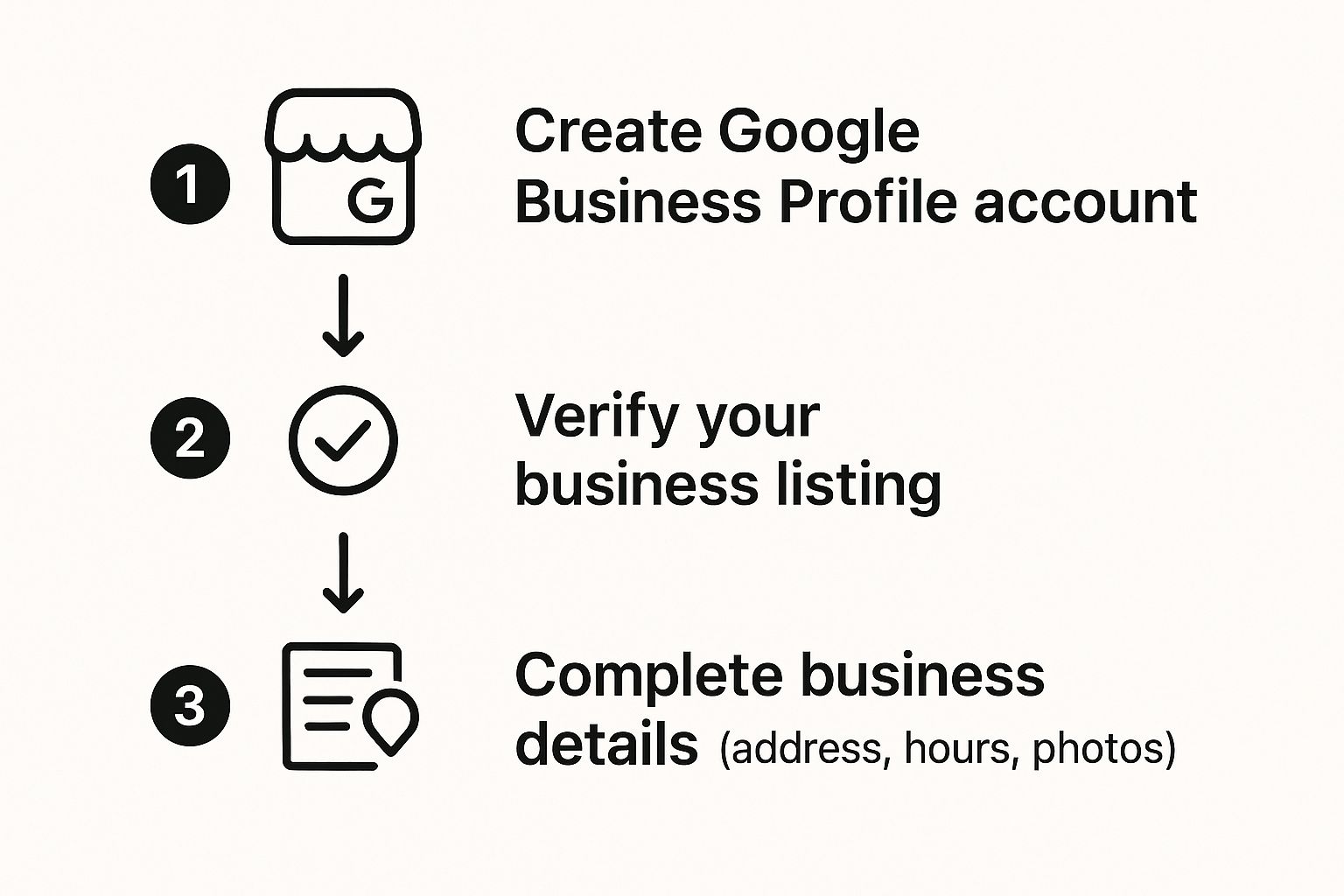
As you can see, the setup revolves around three core pillars: creating the account, successfully completing verification, and then filling out all the crucial business information.
Choosing Your Business Categories
Next, you'll choose a primary category. This is arguably the most critical selection you'll make, as it tells Google the main service you provide. Think broad, but also specific. For instance, if you're a divorce lawyer, "Law Firm" is okay, but "Family Law Attorney" is far more effective.
You can then add secondary categories to capture the full scope of what you do. A real estate agency (your primary category) might add "Property Management Company" and "Real Estate Consultant" as secondary options. Don’t skip this step—it’s how you appear in more specific, high-intent searches from customers who know exactly what they need.
Key Takeaway: Your primary category defines what your business is, while secondary categories define what your business does. Getting this distinction right has a massive impact on the quality of leads you attract through local search.
Navigating the Verification Maze
Once your initial details are in, Google needs to confirm your business is legitimate. Verification is a non-negotiable step to becoming visible on Google Maps and Search, and the method they offer will depend on your business type and location.
Here are the most common verification methods you might encounter:
- Postcard Verification: This is the traditional method. Google mails a postcard with a unique code to your business address, which typically takes 5-14 business days in Australia. Ensure your address is perfectly accurate to avoid frustrating delays.
- Phone or SMS Verification: Some businesses are eligible for a quick verification via an automated call or text message to the listed business phone number.
- Email Verification: If your business email domain matches your website (e.g., info@yourbusiness.com.au), you may be able to verify instantly via email.
- Video Verification: This is becoming more common. You'll be asked to record a short video showing your physical location, business signage, equipment, and proof of management (like holding up keys to the premises or showing business documents).
Once verified, your profile is officially live! While this is a huge milestone, it's only the beginning. The next step is to flesh out every single section of your new profile to turn it into a powerful customer magnet. For a deeper dive into this, you might be interested in our guide on what you should put on your Google Business Profile.
Turning Your Profile Into a Customer Magnet

Getting your profile verified is a great first step, but it's really just the starting line. To stand out and pull in customers, your Google Business Profile must be more than just a listing; it needs to be a high-performance marketing asset. This is where strategic optimisation comes in, turning your profile into a genuine magnet for ideal clients actively searching for what you offer.
It all starts with a compelling business description. This isn't just a space to list your services; it's your opportunity to tell a story.
Think of it as your digital elevator pitch. You have 750 characters to speak directly to your customer's pain points and show them you’re the solution. Weave in relevant local keywords naturally, like "emergency electrician in Ballarat" or "buyers agent for Melbourne properties," to make it clear who you are and where you operate.
The Power of Visuals and Detailed Attributes
In the online world, seeing is believing. Your photos are often the single biggest deciding factor for potential customers. It’s no surprise that a profile with high-quality, professional images gets far more clicks and calls than one with blurry phone snaps or, even worse, no photos at all.
You need to upload a variety of images that showcase every facet of your business. This should include your logo, a great cover photo, shots of your building (inside and out), your team at work, and examples of your products or completed jobs.
A pro tip: geotag your photos with your business location before you upload them. It’s a subtle but effective way to reinforce your local relevance with Google.
Beyond pictures, attributes are the small details that help customers make quick decisions. These are the tags like "wheelchair-accessible entrance," "accepts credit cards," or "free Wi-Fi." The more of these you select, the better Google can match your business to very specific searches. Don't skip them.
Your profile's completeness is a direct reflection of your professionalism. A sparse profile suggests you don't pay attention to detail, while a rich, detailed one builds immediate trust and makes it easy for customers to say "yes."
Detailing Your Products and Services
Just stating you're a "plumber" is not nearly enough. The Google Business Profile Manager lets you build out a full catalogue of your specific services and even your products, complete with descriptions and pricing. This essentially turns your profile into a mini-website, answering your customers' questions before they even think to ask.
For a service business, this means getting specific. Instead of a single entry for "Landscaping," you should break it down into separate services:
- Garden Design: Detail your consultation and creative process.
- Lawn Maintenance: Specify what’s included in your weekly or fortnightly service.
- Reticulation Installation: Explain the systems you use and why they’re superior.
If you sell products, you can add your entire catalogue. A local bakery, for example, could showcase its sourdough loaves, custom birthday cakes, and gluten-free pastries, each with its own photo, price, and mouth-watering description. This clarity removes friction for the buyer and drives more qualified leads your way.
Finally, make sure you enable the messaging feature. This gives customers a direct line to text you right from your profile—a low-effort way for them to get in touch. Responding quickly is critical here, as Google tracks and displays your average response time. A fast reply not only helps the customer but also signals to Google that you're an active, engaged business, which can boost your rankings.
To help you stay on track, we've put together a simple checklist. Work through these points to make sure you're getting the most out of every feature Google offers.
Your Google Business Profile Optimization Checklist
| Feature | Optimization Action | Why It Matters |
|---|---|---|
| Business Description | Write a compelling 750-character summary using local keywords. | Your "elevator pitch" to convince customers and inform Google. |
| Photos & Videos | Upload high-quality, geotagged images of your logo, team, and work. | Builds trust, increases engagement, and proves your local presence. |
| Services/Products | Create detailed entries for each offering with descriptions and prices. | Answers customer questions upfront and captures specific search queries. |
| Attributes | Select all relevant tags (e.g., accessibility, payment types). | Helps Google match you to highly specific user needs. |
| Business Hours | Ensure hours are 100% accurate, including holidays and special events. | Prevents customer frustration and negative reviews from incorrect info. |
| Messaging | Enable the feature and respond to messages promptly. | Provides a low-friction contact method and signals engagement to Google. |
| Q&A Section | Proactively add and answer frequently asked questions. | Controls the narrative and provides valuable information to searchers. |
Following this checklist is the fastest way to build a profile that not only looks professional but also works hard to bring new customers through your door.
Mastering Reviews and Customer Q&As
Your online reputation is built on what your customers say about you. Reviews are no longer just comments; they're the social proof that can make or break a sale with the next person who finds you online. Managing these interactions through the Google Business Profile Manager is one of the most important tasks you have.
For Australian businesses, reviews are a huge deal. One study showed about 33% of consumers always check online reviews before trying a local business, while another 43% do it regularly. This highlights how a steady stream of positive feedback can sway a customer's decision.
How to Proactively Get More Customer Reviews
You must ask for reviews, but there's a fine line between being proactive and being a pest. The trick is to make it incredibly easy for happy customers to leave feedback right when they're feeling positive about your service.
- Timing is everything. Ask for the review immediately after a successful job or a great interaction. A real estate agent should ask right after a settlement goes through. A cafe owner should ask just after a customer compliments the coffee.
- Use a direct review link. Google lets you create a special short link that takes people straight to the "leave a review" pop-up. Include this link in your email signature, on your invoices, and in thank-you messages.
- Keep the language simple. Instead of the generic "Leave us a review," try something more personal. "Did we do a great job today? We'd love it if you could share your experience on Google."
Responding to All Feedback—The Good, The Bad, and The Ugly
How you respond to a review is often more important than the review itself. It’s a public signal to potential customers that you’re engaged, professional, and genuinely care about service. This is a critical part of effective online reputation management for small businesses.
Pro Tip: Set up a couple of response templates for both positive and negative reviews. It saves time and keeps your tone consistent. However, always customize the template with a specific detail from their review so they know a human read it.
For positive reviews, a simple "Thanks so much, [Customer Name]! We're thrilled you enjoyed [specific service/product]" is perfect.
For negative feedback, the goal is simple: acknowledge, apologize, and move the conversation offline. A solid response looks like this: "Hi [Customer Name], we're really sorry to hear about your experience. This isn't the standard we aim for. Could you please email us at [email] so we can make this right?"
Getting Ahead of the Game with the Q&A Section
The "Questions & Answers" feature is a goldmine that most businesses ignore. It lets people ask questions directly on your profile. If you don't answer them, another customer might—and their answer could be wrong.
Take control of this section by seeding it yourself. Think about the top 5-10 questions you are asked constantly. Post them on your profile yourself, and then answer them immediately. This instantly positions you as the expert and smooths the path for potential customers.
Here are a few common examples to get you started:
- "Do you offer free quotes?"
- "What is the parking situation like?"
- "Are you open on public holidays?"
By mastering reviews and Q&As, you transform your profile from a static business listing into a dynamic hub for building trust and connecting with customers.
Using Google Posts to Drive Real-Time Engagement

Think of Google Posts as your business's live billboard, right there in the search results. A static profile is an invisible profile. Posts are what keep your listing fresh, dynamic, and interesting to anyone who finds it. It’s your most direct channel to announce promotions, news, and events at the exact moment people are looking for you.
Using Posts regularly sends a strong signal to Google that you’re an active, engaged business—a positive factor for your local search ranking. More importantly, it gives you a massive competitive edge, letting you grab someone's attention before they even click on a competitor's website.
Crafting Posts That Actually Convert
The key to effective posts is knowing which type to use and when. Each one has a specific job, and you can manage them all from your Google Business Profile Manager.
Here’s the breakdown:
-
Offers: These are your action-drivers. Use them for special discounts, limited-time deals, or exclusive promotions. A recruitment agency, for example, could post an offer for a "Free CV review this week only." Pro tip: always include a clear expiry date to create urgency.
-
What's New: This is your all-rounder for general updates. Share company news, showcase a recently completed project, or introduce a new team member. A real estate agent might post a photo of a "Just Sold" property in a key suburb to showcase their local expertise.
-
Events: Perfect for webinars, workshops, open houses, or local community meetups. You can set a date and time and even add a registration link. A wellness practitioner could create an event post for an "Introductory Meditation Workshop" to drive sign-ups directly from their profile.
Key Takeaway: Every single post should be designed to get a click. That means using high-quality, eye-catching images (or short videos), writing a punchy headline, and finishing with a crystal-clear call-to-action (CTA) button like "Book," "Learn More," or "Call Now."
Building a Simple Content Plan
Consistency beats frequency every time. You don't need to post daily, but aiming for at least one new post a week keeps your profile looking current. Posting randomly gets you random results, so a simple plan makes all the difference.
You could schedule your posts something like this:
- First week of the month: An "Offer" post with a monthly special.
- Second week: A "What's New" post sharing a glowing customer testimonial or a behind-the-scenes photo.
- Third week: Another "What's New" post, perhaps linking to a new blog article on your site.
- Fourth week: An "Event" post if you have something on the horizon, or another compelling offer to finish the month strong.
This straightforward rhythm ensures your profile stays lively and persuasive, helping turn casual searchers into engaged customers.
Your Google Business Profile Manager FAQ
Working with Google Business Profile Manager can sometimes feel like navigating a maze. It's easy to get tripped up by a small setting or a confusing option.
To save you the headache, here are answers to the most common questions business owners ask. Think of this as your go-to guide for those "how on earth do I…" moments.
How Do I Add Someone Else to Manage My Profile?
You don't have to do it all alone. Bringing in a team member or a digital marketing partner is surprisingly straightforward.
First, head to your Business Profile settings and find ‘People and access.’ From there, just click the ‘Add’ button, enter their email address, and assign them a role—either ‘Owner’ or ‘Manager.’
A Manager can handle all the day-to-day tasks like replying to reviews or creating posts. The best part? They can't remove other users or delete the profile, which keeps your most important digital asset safe.
Why Did My Business Address Disappear from Google Maps?
This is a classic issue, especially for service businesses. Nine times out of ten, it’s because your profile is set up as a ‘Service Area Business,’ which automatically hides the physical address.
To fix this, jump into the ‘Info’ tab on your profile and check your address settings. If you have a storefront or office where customers can visit, ensure your full address is entered correctly. Crucially, you need to check that the option to show your address to customers is enabled. You may have to re-verify your profile after this, but it’s worth it.
If you’re a purely mobile business, a hidden address is fine. But if you have a shop, clinic, or office, making that address visible is non-negotiable for getting people through the door.
Can I Manage Multiple Locations from One Account?
Absolutely. In fact, the Google Business Profile Manager was designed for this exact scenario.
For businesses with more than one branch, you can create a ‘business group’ (formerly known as a location group). This feature lets you organize and manage all your profiles from one central dashboard. It’s a massive time-saver, allowing you to push out updates—like new posts or holiday hours—to every single location at once.
What’s the Difference Between a Primary and a Secondary Category?
Getting your categories right has a huge impact on where you show up in local search. Your primary category is your single most important business descriptor. It should clearly define what your business is at its core.
Secondary categories are for everything else you offer. For instance, an accounting firm’s primary category would be ‘Accountant.’ Their secondary categories might then include ‘Bookkeeping Service’ and ‘Tax Consultant’ to capture people searching for those specific services.
Ready to stop tinkering and start getting real, measurable results from your Google Business Profile? The team at Homer Digital Marketing lives and breathes this stuff. We specialize in optimizing your online presence to bring your ideal clients right to your door.
Book a discovery call today and let’s build a strategy that drives real growth for your business.
