

Ever wonder if your marketing is actually working?
You launch a Google Ad or send out an email blast, see the views and opens roll in, but those numbers don't tell the whole story. A simple click-through rate calculator cuts through the noise and shows you how many people who saw your content—whether it's an ad, an email, or a post—cared enough to click on it. It promises a clear solution to measuring true engagement.
The formula is simple: divide your total clicks by your total impressions, then multiply by 100 to get a percentage.
Why Your Click-Through Rate Is a Critical Metric
So, why does this one number matter so much? Because your Click-Through Rate (CTR) is the real measure of engagement. It’s the metric that signals genuine interest.
CTR tells you, in black and white, how compelling your message, offer, and creative truly are to your target audience. A high CTR means you’ve hit the mark and your content is resonating. On the flip side, a low one is an early warning sign that something’s off.
For service-based businesses in Australia—from real estate agents to wellness coaches—getting your head around this metric is non-negotiable.
Breaking Down the CTR Formula
Calculating CTR is easy enough, but understanding what each part of the formula tells you is where the real insights come from.
Here's the formula again: (Total Clicks / Total Impressions) x 100 = CTR (%).
Let’s quickly unpack what these inputs mean for your business.
A Quick Look at the CTR Formula
This table breaks down the essential inputs for the Click-Through Rate calculator and what they represent in your marketing campaigns.
| Metric | What It Tells You | Where to Find It |
|---|---|---|
| Total Clicks | The number of people who took action. Each click shows active interest in your offer. | Google Ads dashboard, email marketing software, social media analytics. |
| Total Impressions | How many times your content was displayed. It tells you about your reach and visibility. | Ad platforms like Google and Facebook, or your email campaign reports. |
Think of it like having a shopfront on a busy street. Impressions are all the people who walk past your window. Clicks are the ones who liked what they saw enough to open the door and come inside. This simple calculation turns vague data into a clear performance score.
Key Takeaway: Your CTR isn't just another number; it's a direct measure of relevance. It tells you if you're putting the right message in front of the right people at the right time. A strong CTR is almost always the first step towards a better conversion rate.
Making It Easy with a Calculator
While the maths isn't complicated, using a dedicated click-through rate calculator makes life a whole lot easier, especially when you’re tracking multiple campaigns across different channels.
It takes human error out of the equation and gives you instant results so you can focus on strategy, not arithmetic. For a deeper dive into the tool itself, check out this Ultimate Click-Through Rate Calculator and Guide.
Having a reliable tool handy means you can quickly check a campaign’s health. Whether you’re A/B testing ad headlines or figuring out which email subject line works best, a calculator gives you the immediate feedback you need to make smart, data-backed decisions that bring more ideal clients to your business.
Benchmarking Your Google Ads Performance
Running Google Ads without knowing your click-through rate is like flying blind. You might be spending money and getting eyeballs on your brand (impressions), but you have no real idea if you're actually connecting with potential clients. Your CTR is the metric that tells you exactly how well your ads are doing their job.
For Australian service businesses, this number is mission-critical.
Let's say a real estate agent in Sydney launches a new campaign for "luxury waterfront properties". The ad gets 10,000 impressions in a week, and out of those, 350 people click through to the website. That data is the starting point for figuring out what's working.
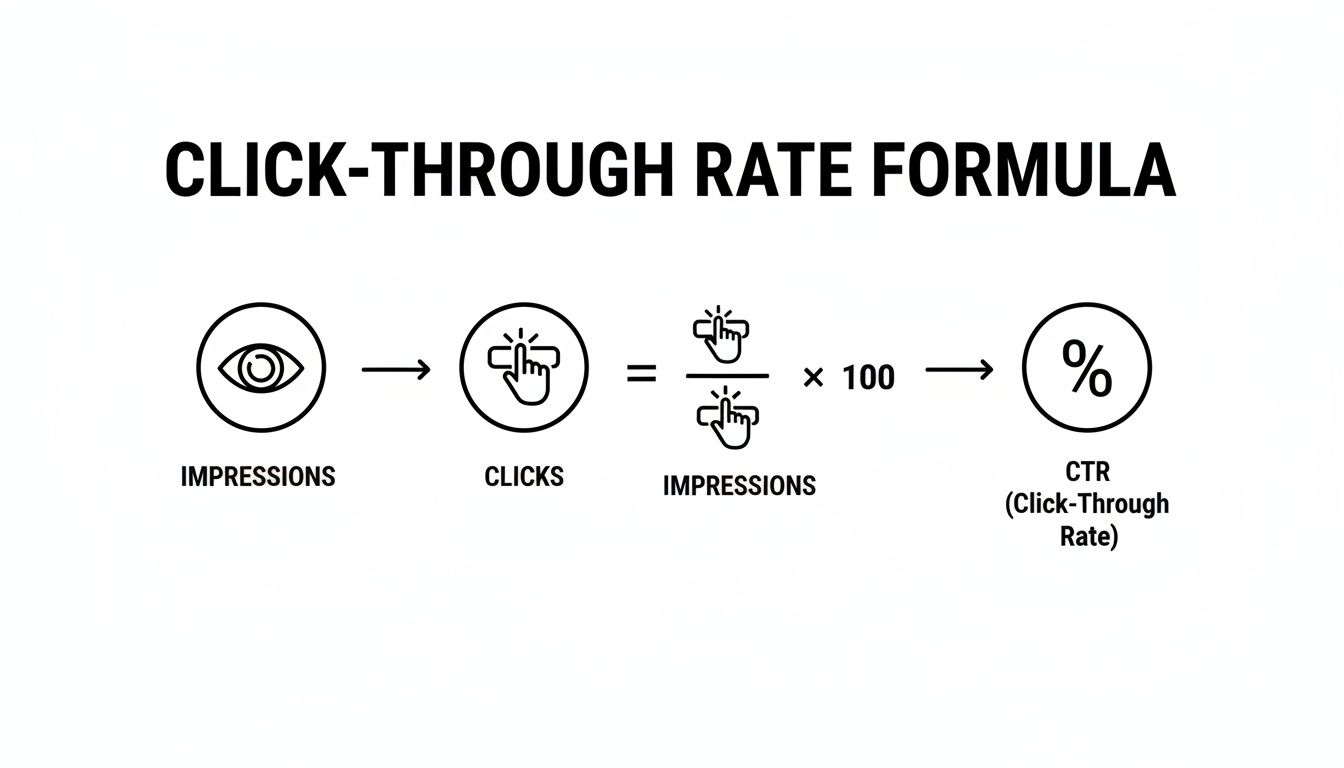
This simple formula shows that CTR is a direct measure of how many people who saw your ad were interested enough to take the next step.
What Is a Good CTR for Google Ads?
For our real estate agent, the CTR works out to be 3.5% (350 clicks ÷ 10,000 impressions x 100). But is that any good? On its own, the number doesn't mean much. This is where industry benchmarks come in—they give you the context to properly evaluate your performance.
Across Australia, service-based businesses are seeing solid click-through rates. The real estate sector actually leads the pack, with an average CTR of 3.71% for search campaigns.
This data shows our Sydney agent’s 3.5% CTR is pretty healthy, sitting just under the industry average. It's a decent result, but it also signals there’s room to improve. Maybe a stronger headline or a clearer call to action could nudge that rate above the 3.71% benchmark.
Pro Tip: Don't get fixated only on the industry average. Dig into your own campaign data. You might find one ad group is pulling a 6% CTR while another is lagging at 1.5%. This tells you exactly where to focus your attention.
How to Find Your CTR in Google Ads
Thankfully, finding your CTR in the Google Ads platform is easy. When you log in, your main dashboard gives you a top-level view of all the key metrics for your campaigns.
To drill down, just follow these simple steps:
- Go to the “Campaigns” tab in the left-hand menu.
- Choose the specific campaign you want to look at.
- Make sure the columns for “Clicks,” “Impressions,” and “CTR” are showing. If not, click the “Columns” icon, select “Modify columns,” and add them from the “Performance” section.
This view gives you a clean, side-by-side comparison of how your ads are performing.
A low CTR often means there's a disconnect between your keywords, ad copy, and landing page. For example, if your keywords are too broad, your ad might show up in irrelevant searches, which means fewer clicks.
On the other hand, a high CTR shows that your message is perfectly aligned with your audience. This is the first step towards managing an efficient ad spend. To learn more about budgeting effectively, check out our guide on understanding Google Ads costs.
Gauging Engagement on Email and Social Media
Beyond paid ads, your email list and social media channels are your direct line to ideal clients. But don't get fooled by vanity metrics like open rates and follower counts—they don't pay the bills. Calculating the click-through rate for these platforms cuts through the noise and shows you who's genuinely interested in what you have to offer.

While the core CTR formula stays the same, the context is completely different. A click on an email link or a social post signals a much deeper level of intent than a simple 'like' or 'open'. It's the action that turns a passive observer into someone actively moving through your sales process.
Decoding Your Email Campaign Performance
When it comes to email marketing, there are two numbers you need to watch: the standard Click-Through Rate (CTR) and the far more revealing Click-to-Open Rate (CTOR).
Let's say a Melbourne recruitment agency sends a newsletter to its list of 5,000 subscribers. The email gets opened by 1,500 people, and 150 of them click a link to a new job listing.
Here’s what the two calculations tell you:
-
Standard CTR: This measures clicks against the total number of emails you sent out.
- Formula: (Total Clicks / Total Emails Sent) x 100
- Example: (150 clicks / 5,000 emails) x 100 = 3% CTR
-
Click-to-Open Rate (CTOR): This tells you how many people who actually opened your email were compelled to click. It’s a much purer measure of how good your content and offer really are.
- Formula: (Total Clicks / Unique Opens) x 100
- Example: (150 clicks / 1,500 opens) x 100 = 10% CTOR
The 3% CTR gives you the big picture, but the 10% CTOR shows the content was a hit with the people who saw it. A high CTOR is a massive win—it means your call to action landed perfectly. This is where truly understanding EDM marketing fundamentals makes all the difference in crafting messages that get clicks.
Key Insight: Got a high open rate but a terrible CTOR? Your subject line was great, but the email body or offer fell flat. On the flip side, a low open rate with a high CTOR means your content is compelling, but you need to write more enticing subject lines to get people to see it.
Measuring Clicks on Social Media
Social media is a crowded space, making a click an incredibly valuable signal of real interest. Likes are cheap, but a click shows someone wants to learn more, visit your site, or check out your offer. The standard CTR formula is your best friend here.
Imagine a wellness coach running a Facebook Ad campaign. The ad is shown to 20,000 people (impressions) and gets 400 clicks through to their booking page.
- Calculation: (400 clicks / 20,000 impressions) x 100 = 2% CTR
Is a 2% CTR good? For a wellness business on Facebook, that's a solid result. It tells you the ad creative and targeting are working well together to grab attention. Using a click-through rate calculator is a fast way to compare different ad versions and pinpoint which message drives the most traffic.
In Australia, email marketing benchmarks show a standout click-to-open rate (CTOR) of 8.30% and an average click-through rate around 2.09%, putting us ahead of global averages. This makes email a powerhouse channel for service businesses, from coaches to recruitment agencies. This strong local performance really highlights why you need to be tracking these numbers to stay competitive.
Turning CTR Insights Into Action
So, you’ve plugged your numbers into a click-through rate calculator, and now you have a percentage staring back at you. What’s next? This is where the real work begins.
A CTR figure is just raw data. Its true value lies in the story it tells you about what’s working—and what’s not—in your marketing. Is a low CTR a symptom of weak ad copy? A poorly defined audience? Or an offer that just isn't compelling enough to make someone stop scrolling?
Getting to the bottom of that story is the first step. Until you translate that number into a clear diagnosis, you’re just guessing.
Diagnosing a Low Click-Through Rate
A low CTR is a massive clue. It tells you there’s a disconnect somewhere between the message you’re sending and the people you’re trying to reach. Instead of seeing it as a failure, think of it as direct feedback showing you exactly where to focus your attention.
Usually, a few common culprits are to blame.
Your ad copy or email subject line might be too generic to cut through the noise. If your headline doesn't immediately grab attention or poke at a specific pain point, your ideal client will just keep scrolling.
Another classic issue? Your targeting is off. You could have the most amazing, irresistible offer in the world, but it will fall completely flat if you’re showing it to people who have no interest in what you do.
And finally, the offer itself might just be a bit… meh. If there’s no clear, immediate benefit or sense of urgency, people simply won't bother clicking.
A low CTR is rarely caused by one single mistake. It's usually a combination of factors. By systematically testing your headlines, audience segments, and offers, you can pinpoint what needs fixing to get your results climbing again.
Actionable Strategies to Boost Your CTR
Once you’ve got a handle on the why, it’s time to take action. Improving your CTR isn’t a one-and-done fix; it’s an ongoing process of tweaking and refining. Here are a few proven strategies we use day in, and day out to lift campaign performance for our clients.
Low CTR Diagnosis and Action Plan
When your CTR is looking a bit grim, it’s easy to feel stuck. This table breaks down the most common reasons for a low click-through rate and gives you a clear, actionable starting point for what to test next. Think of it as your troubleshooting guide to get things moving in the right direction.
| Potential Problem | Actionable Solution to Test |
|---|---|
| Boring or Vague Headline | A/B test a question-based headline (e.g., "Tired of X?") against a benefit-driven one (e.g., "Get X in 3 Easy Steps"). |
| Wrong Audience | Refine your targeting. In Google Ads, add negative keywords. On LinkedIn, layer job titles with company size. |
| Weak Call to Action (CTA) | Test a direct CTA ("Book Your Demo") against a softer one ("Learn More"). Sometimes a small word change makes all the difference. |
| Uninspired Visuals | Swap your stock photo for a real image of your team or a simple, bold graphic. Test a short video instead of a static image. |
| Offer Lacks Urgency | Add a time-sensitive element like "Offer Ends Friday" or mention limited availability to encourage immediate clicks. |
| Ad Scent is Off | Ensure your ad copy, landing page headline, and offer are all perfectly aligned. Any disconnect kills trust and clicks. |
Start with the most likely problem, test one change at a time, and measure the impact. This methodical approach is the fastest way to figure out what your audience truly responds to.
Refine Your Ad Copy and Headlines
Your headline does 80% of the heavy lifting. It has to be specific, benefit-driven, and hit an emotional trigger.
- Ask a Question: Headlines like "Tired of Inconsistent Leads?" get straight to a prospect's pain point.
- Use Numbers: "3 Ways to Improve Your LinkedIn Profile This Week" feels tangible and achievable.
- Create Urgency: Phrases like "Limited Spots Available" or "Offer Ends Friday" nudge people to act now.
Sharpen Your Audience Targeting
Getting your message in front of the right eyeballs is non-negotiable. Platforms like Google Ads and LinkedIn let you get incredibly granular with this.
Don't settle for broad demographics. Use negative keywords in Google Ads to stop wasting money on irrelevant searches. On LinkedIn, layer your targeting with job titles, company size, and industry groups to connect with actual decision-makers. The more relevant your audience, the higher your CTR will climb.
A/B Test Everything
Never, ever assume you know what will work best. The market will always surprise you. Continuous testing is the secret to finding the winning formula.
- Headlines: Test a benefit-driven headline against a question-based one.
- Images: Does a photo of a person outperform a branded graphic?
- Calls to Action (CTAs): Compare "Learn More" with "Get Your Free Consultation."
This cycle of testing, measuring, and refining is the core of CRO. You can learn more about how small tweaks drive big results by exploring the fundamentals of what conversion rate optimisation is and how it ties directly to your CTR.
And while you're at it, you can also learn some great strategies to improve your Amazon CTR—many of the principles are universal and will give you fresh ideas to test elsewhere.
By turning insights from your click-through rate calculator into a concrete action plan, you transform a simple metric into a powerful tool for sustainable business growth.
Integrating CTR Into Your Marketing Systems

Running a one-off calculation in a click-through rate calculator is fine for a quick health check. But it won’t build you a predictable client acquisition system. The real power kicks in when you stop doing manual spot-checks and start automating your tracking.
Embedding CTR monitoring directly into your marketing operations is how you turn a reactive metric into a proactive growth tool. It means plugging it into the systems you already use every day. This lets you spot trends, flag underperforming campaigns, and make smarter decisions much, much faster.
Honestly, for any service business serious about consistent growth, this is non-negotiable.
Building Your CTR Reporting Dashboard
First things first: you need a central dashboard that pulls in CTR data from all your key channels. Whether you use Google Data Studio, a simple spreadsheet, or a dedicated reporting tool, the goal is to see everything in one place. It stops you from having to log into five different platforms just to get a clear picture.
A good dashboard should show you CTR trends over time, visually. Is your email engagement slowly dying? Did that new Google Ads campaign cause a massive spike? Seeing it in a graph makes it impossible to ignore what’s really going on.
Your dashboard should break down:
- Overall CTR: A blended average across all channels to give you a gut-check on your brand's overall pull.
- Channel-Specific CTR: Separate figures for Google Ads, LinkedIn, Facebook, and email to pinpoint exactly where you're winning or losing.
- Campaign-Level CTR: Drilling down into individual campaigns to see what specific message or offer is actually hitting the mark.
This creates a simple, effective reporting loop that keeps your whole team focused on the numbers that drive results. It shifts CTR from an abstract idea to a core part of your weekly or monthly reviews.
By automating CTR tracking in a central dashboard, you free up your time to focus on strategy, not data entry. It ensures you’re always making decisions based on the latest performance data, not last month's old news.
Automating Alerts for Performance Dips
Once your dashboard is humming along, the next move is to automate your alerts. Most modern marketing and analytics platforms let you set up custom notifications based on performance triggers. Think of this as your early warning system.
Instead of waiting until the end of the month to discover a key campaign has stalled, an automated alert can flag the problem within days.
For example, you could set up an alert that pings you if:
- The CTR on your main Google Ads campaign drops below 2.5% for more than three days straight.
- A new email newsletter gets a Click-to-Open Rate (CTOR) below 8%.
- A LinkedIn ad's CTR falls way below the benchmark you’ve set.
These alerts flip the script from reactive to proactive. You can jump on a problem immediately, figure out what’s wrong, and push out a fix before a small dip turns into a major issue that’s burning through your marketing budget.
Connecting CTR to Your CRM and Automation Tools
The final piece of the puzzle is linking your CTR data back to your Customer Relationship Management (CRM) and marketing automation software. This is where you close the loop between clicks and cash.
When someone clicks a link in an email or an ad, that action shouldn't just be an anonymous number on a spreadsheet. It should trigger something. For instance, a high-intent click—like someone hitting your "Book a Consultation" link—can be used to automatically tag that lead in your CRM as a hot prospect.
This simple connection lets you:
- Score Leads More Accurately: A contact who consistently clicks on your stuff is clearly more engaged and should get a higher lead score. Simple.
- Trigger Nurture Sequences: If someone clicks a link about a specific service, you can automatically drop them into a targeted email sequence that offers more value on that exact topic.
- Inform Sales Conversations: Your sales team can see a lead's click history, giving them incredible context to personalise their outreach instead of going in cold.
Integrating CTR this way makes your entire marketing system smarter. It ensures that the engagement you're working so hard to create is directly tied to actions that move potential clients closer to a sale.
CTR Questions Answered
Once you start tracking your click-through rate, you'll find it raises more questions than it answers. It’s a simple metric on the surface, but it's tangled up in every other part of your marketing.
Here are the most common questions I hear from service business owners, with some straight-talking advice to help you make sense of your analytics.
What’s a “Good” CTR for a New Campaign?
For a brand-new campaign, trying to define a "good" CTR is a bit like guessing the weather. Without any of your own data to go on, the best you can do is look at industry benchmarks. For most Aussie service businesses on Google Ads, anything over 2% is a decent place to start.
But honestly, your initial CTR isn't a final grade—it's just the starting line. The first few weeks are all about gathering data, not hitting some magic number. I'd much rather see a 1.5% CTR that brings in high-quality leads than a 4% CTR that generates nothing but tyre-kickers.
Use that first month to figure out what your baseline is. After that, the goal is simple: beat your own numbers, week after week.
Expert Tip: Don't freak out if your CTR is low at the beginning. New campaigns, particularly on platforms like Google Ads, have a "learning phase." Give the algorithm time to do its thing and wait until you have enough data to make smart decisions.
How Often Should I Be Checking My CTR?
This really depends on the channel and how much traffic you’re getting. Check too often, and you'll end up making panicked decisions based on a handful of clicks. That’s a recipe for disaster.
Here’s a schedule that works for most service businesses:
- High-Spend Ad Campaigns (like Google Ads): Check in 2-3 times a week. This lets you catch problems like ad fatigue or a sudden performance dip without knee-jerk reactions to daily ups and downs.
- Email Marketing: Look at the numbers 24-48 hours after you hit send. Most of your opens and clicks happen in that window, so you'll get a clear picture of how it went.
- Organic Social Media: Review this weekly or bi-weekly. Organic reach is a slow burn, so you need a longer timeframe to spot any real trends.
The best way to stay on top of it is to automate your reporting into one dashboard. That way, you can keep an eye on things without getting lost in the weeds.
Does a High CTR Automatically Mean More Sales?
This is a big one, and the answer is a hard no. A high CTR is a great sign—it means your headline, ad copy, or image was compelling enough to grab someone's attention. But it doesn't guarantee a single thing after that click.
Think of it like this: your ad got them to walk into your shop. But if they get inside and the layout is a mess, the prices are hidden, or it's not what they were promised, they'll walk right back out.
This is why "ad scent"—the consistency between your ad and your landing page—is so critical. If your ad screams "Free Consultation" but the landing page is just a generic "Contact Us" form, that disconnect will absolutely murder your conversion rate. A high CTR with a low conversion rate is a massive red flag telling you the problem is on your landing page.
How Do CTR, Conversion Rate, and CPC Fit Together?
These three metrics are joined at the hip, especially on paid platforms like Google Ads.
- CTR and CPC: This is often an inverse relationship. A high CTR tells Google your ad is super relevant to what the user is searching for. To reward you for creating a good experience, Google’s algorithm often bumps up your Quality Score, which in turn can lead to a lower Cost-Per-Click (CPC). So yes, a better CTR can literally make your ads cheaper.
- CTR and Conversion Rate: As we just covered, a high CTR doesn't promise a high conversion rate, but you can't have one without the other. No click, no conversion. Simple as that. A higher CTR just gives you more shots on goal by filling the top of your funnel with more prospects.
At the end of the day, CTR is the gateway metric. Nailing it is often the first domino that needs to fall to create a more efficient and profitable marketing engine.
Ready to stop guessing and start making data-driven decisions? The systems and strategies at Homer Digital Marketing are designed to help service businesses like yours turn clicks into clients. Discover how we can help you scale.
